
Introduction
Tmux has a steep learning curve. The real power of tmux is in its scripting layer: a session per task, a dedicated project directory (often a git worktree per branch), and a thin set of scripts and keybindings to create repeatable workflows. I wrote it for anyone already running more than one agent at a time, or about to, who is comfortable with basic tmux, has some familiarity with git worktrees, and wants the workflow part. If tmux or git worktrees are new to you, open the boxes below first.
If you are new to tmux, read this first.
Tmux is a terminal multiplexer. It nests three things: a session is a persistent workspace (I run one per task); a window is like a tab inside a session; and a pane is a single rectangular split within a window, one shell running one program, say a coding agent. Split a window in two and you have two panes side by side. The part that matters here is that all of them keep running inside a background server even after you close the terminal or disconnect. You drive it with a prefix key (mine is remapped to Ctrl-a); every shortcut below is that prefix, then another key. There are only a handful worth putting to muscle memory.
If you are new to worktrees, read this first.
A git worktree is a second working directory checked out from the same repository. Normally a repo has one working copy and you switch branches inside it; with worktrees you get several folders on disk at once, each on its own branch, all sharing the same history and remotes. You create one with git worktree add ../some-folder -b my-branch. The reason it matters here is that two agents can work in two folders on two branches without touching each other’s files or fighting over a single checkout.
I picked up tmux this year, mostly to stop drowning in terminal tabs. Before long I had three or four coding agents running at once, each on its own branch, plus a couple more reviewing PRs, but the setup was not great. I wanted to reduce the git plumbing around each task. So I gave it a weekend to understand the scripting underneath. Most of it went into turning the things I do over and over (start a task, find the one that’s waiting on me, clean up afterward) into one-key workflows. That’s most of what’s below.
The mental model: tmux is an always-on server
Running tmux starts a daemon. My windows and panes live inside that daemon, not inside the terminal I typed the command in. The terminal I’m looking at is just a client that happens to be attached. So I can quit it entirely, come back later, run tmux attach, and land right back on an agent that’s still typing. The work was in the server the whole time, not the terminal.
Attaching is only one kind of client, though. Every other tmux command is a short-lived client too: it connects to the daemon, does its one thing (type a key into a pane, read a pane’s contents back, list the sessions), and exits. So sending a command isn’t the same as attaching, it’s just a quick round-trip to the server about a named target.
You can also run multiple tmux servers. For example, I keep a disposable one, tmux -L scratch, separate from my main sessions for throwaway experiments I don’t want cluttering the fleet. The ability to interact with a session without ever attaching to it is what makes everything below scriptable. Later on, it’s also what lets one agent drive another.
Mapping workflows to keys
This is where it starts to pay off. The agents do most of the actual coding now, so what consumes my time is everything around each task: cd-ing into the right folder, cutting a branch or a worktree, rebasing on main, hunting down whichever agent is working or stuck. All of that is scriptable, though. Every tmux command is just a message to the server about some target, so a plain shell script can read and drive my terminals without me looking at them. A few commands do almost all of it: send-keys to type into a pane, capture-pane to read one back, and display-message to ask a pane about itself (in the examples, api is just a session I’ve named):
# what's this session running right now?
tmux display-message -p -t api '#{pane_current_command}'

# read the last screenful back out, not even attached
tmux capture-pane -p -t api

# type into it from outside
tmux send-keys -t api 'pnpm test' Enter
Every routine I repeat gets folded into a small script and bound to a key.
Here’s the whole set in one place: the key, the script behind it, and what fires when I press it. Everything below is a walk through these rows.
| Key | Script | What happens |
|---|---|---|
prefix + s | (built-in) | Session picker with live previews, for jumping between tasks |
prefix + T | new-task.sh | One name → branch, worktree, config symlinks, pnpm install, and a session I’m dropped into |
prefix + G | agent-status.sh | One board of who’s idle / working / waiting / done, from the state the hook writes |
prefix + P | pr-review.sh | PR URL → a fresh throwaway pr-<repo>-<n> session running /code-review on it |
prefix + S | sync-branch.sh | Rebase this branch onto origin/main (autostash), reinstalling only if the lockfile moved |
prefix + X | cleanup-tasks.sh | Tick the finished tasks → removes each folder, kills its session, deletes the branch |
Two more pieces run on their own, not on a key: a Claude state-change hook that colors the iTerm tab and feeds the fleet board, and a small skill that lets one agent read and drive another’s session.
Every command in this post is bound to a keystroke. My prefix key is Ctrl-a, then a single letter. The shell you’ll see is just what those keys trigger, not lines I retype.
Those scripts live wherever you point your keybindings. Mine sit in ~/.tmux/, next to where the plugin manager drops plugins (~/.tmux/plugins/), but nothing about that folder is special. They’re plain shell scripts, so put them where you like.
I use those #{...} format strings a lot. They’re a tiny templating language, and I reuse the same little expressions in scripts, in keybindings, and in my status bar.
Sessions and tasks
I run each task in its own session, named after the task, with the agent running inside it. I detach, go do something else, come back later, and it’s exactly where I left it.
Switching tasks is switching sessions.
Jumping between sessions is one keystroke: prefix + s drops down the session list, and I tab through to whichever task I want. The preview panel at the bottom shows what each one is doing, an agent mid-edit or a test run scrolling past, before I even switch.
Without this I’d have a lot of terminal tabs. But a session isn’t enough on its own. Each task also needs its own files, and agents can’t share one working directory.
Creating a task
A git worktree is a second working directory on the same repo with its own branch checked out. Same history, same remotes, but its own files on disk, so two agents can go off and do completely different things without stepping on each other.
A new task needs more than a session. It needs a branch, a folder for that branch, the config git doesn’t track (.env, .claude), its dependencies installed, and the session pointed at the folder. Tiny steps, but I do this many times a day. So I folded the whole thing into one command and bound it to prefix + T: it pops up, asks for a name, and that one name becomes the branch, the folder, and the session. Roughly the shape of it:
# new-task.sh <name>
dir="$WORKTREES/$name"

if [ ! -d "$dir" ]; then                                     # first time I touch this task
  git -C "$REPO" fetch --quiet origin main
  git -C "$REPO" worktree add -b "$name" "$dir" origin/main
  mkdir -p "$dir/.claude"                                    # worktree may not have it yet
  ln -s "$REPO/.claude/settings.local.json" \
        "$dir/.claude/settings.local.json"                   # the config git ignores
  ln -s "$REPO/.env" "$dir/.env"                             # and the env vars
fi

tmux new-session -ds "$name" -c "$dir"                        # a session rooted in the folder
tmux send-keys  -t "$name" 'pnpm install' Enter              # deps, on a fresh worktree
tmux switch-client -t "$name"                                # and drop me in
($WORKTREES is the parent folder I keep worktrees in; $REPO is my main checkout.) By the time I’ve finished typing the name there’s a branch, a folder, its config, a pnpm install running, and a session I’m already sitting in.
Worktrees don’t copy your gitignored files.
To handle that:
- I symlink the config.
.claude/settings.local.json(my local permissions) and.envaren’t in git, so a fresh worktree doesn’t have them. The symlinks point at the one copy in the main checkout, so editing them once updates every worktree. - I install
node_modules, never symlink it. You can symlink it. Nothing wrong with that, and I do for some other repos. But pnpm hard-links from a global store, so a per-worktree install is cheap anyway. So: link the config, install the modules.
I don’t build anything up front either, though that depends on the project. Mine doesn’t need a build to exist before I start working, so it happens the first time I actually run something, not when I create the folder. A project with a heavier build step might add a pnpm build to new-task.sh right after the install. The worktree scaffolding is the reusable part; what you run once the dependencies are in is up to you.
Knowing who needs me
With multiple agents going, the thing I actually need is to know which one has stopped and is waiting on me, without opening each session to check. I need two things for this: an ambient signal that’s always on, and a board I can pull up on demand.
The ambient signal
The ambient one is the iTerm2 tab color. Claude runs a little script of mine whenever it changes state, so the tab goes orange when an agent finishes, red when it’s blocked waiting on me, and back to normal the moment I send it a message.
The fiddly part is that Claude runs those hooks with no terminal attached, so the script has nothing to print an escape code to. What it does instead is ask tmux which tty the session is sitting on, and write straight to that:
# the pane that fired the hook lives on some tty; find it, write to it
pane_tty=$(tmux display-message -p -t "$TMUX_PANE" '#{pane_tty}')
printf '\033Ptmux;\033\033]6;1;bg;red;brightness;255\007\033\\' > "$pane_tty"

# same hook, same moment: record the state so the board (next section) can read it
sess=$(tmux display-message -p -t "$TMUX_PANE" '#S')
printf 'waiting\n' > ~/.tmux/state/"$sess"
The \033Ptmux;… wrapper is tmux’s passthrough escape: it tells tmux “don’t interpret this, just hand it to the terminal you’re drawing into,” which is how an iTerm2 tab-color code gets from inside tmux out to iTerm. It only works because I’ve turned on set -g allow-passthrough all. (That #{pane_tty} is one of the #{…} format bits from earlier; $TMUX_PANE is set automatically by tmux for anything running in a pane. The real script sets all three color channels, not just red.)
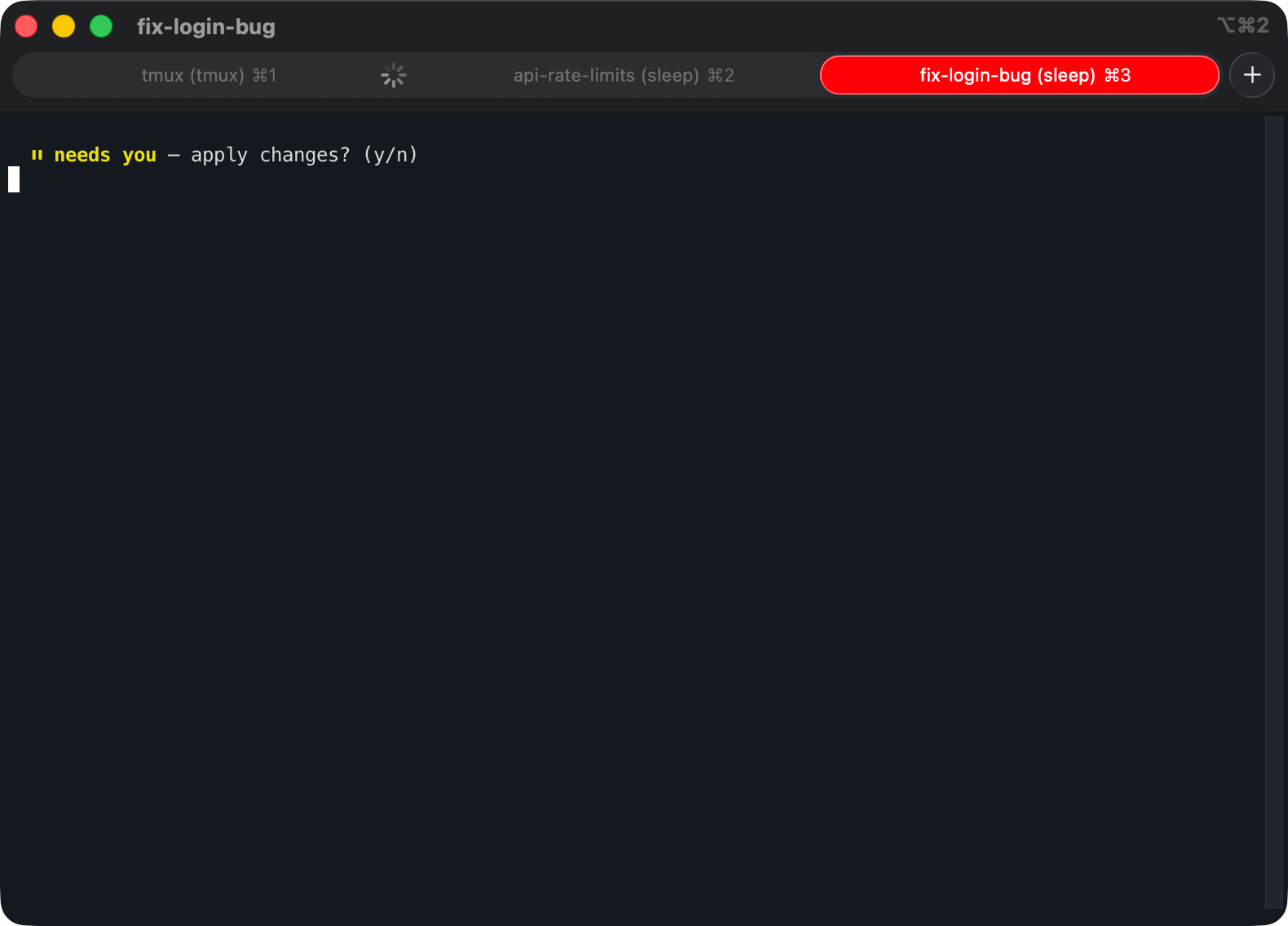
That covers me while iTerm’s in front of me. When I’ve detached and stepped away, there’s no tab to color, so the same state-change hook also fires a push notification, and a blocked agent reaches me with no terminal open at all.
The board, on demand
The board is one keystroke, prefix + G. Its state comes from the same tab-color hook: that hook fires exactly when an agent changes state, so I have it write one word per session into ~/.tmux/state/<session>, and the board just reads the files:
# agent-status.sh, bound to prefix + G
for s in $(tmux list-sessions -F '#{session_name}'); do
  case "$(cat ~/.tmux/state/"$s" 2>/dev/null)" in
    waiting) state="⏸ waiting" ;;   # Claude fired a Notification hook
    working) state="⏳ working" ;;   # I submitted a prompt
    done)    state="✓ done"    ;;   # Claude fired a Stop hook
    *)       state="· idle"    ;;   # no agent, or nothing yet
  esac
  printf '  %-16s %s\n' "$s" "$state"
done
The state is whatever the agent last reported, the moment it changed. One hook, two consumers: it colors the tab and it feeds the board.
Between the two I leave four agents running and never wonder who’s waiting. The tab lights up on its own, and when I want the whole picture at once it’s one key away. That’s the change that made running several at once feel manageable.
Agents driving agents
The same capture-pane and send-keys commands work just as well when an agent runs them, not just me. So I gave Claude a small skill that wraps them: it can list the other sessions, read what any of them is showing, and type into one. Now I can tell the agent in front of me to go check on another task or hand something off to it, and it does that without me switching anywhere.
# from one session, read another agent's live screen
tmux capture-pane -pt api

# and send it somewhere useful
tmux send-keys -t api 'rebase on main, then run the tests' Enter
capture-pane hands back the other session’s live screen, so I get whatever the agent is doing right now: the reasoning in progress, the tool call it’s mid-way through, the question it’s about to ask, not just its finished output. Separate iTerm tabs can’t do that, since one tab can’t read another. tmux keeps every session in one server, so anything with access to it, me or an agent I point at it, can read any of the others.
Reviewing a PR
Not every task is a branch I’m building. A lot of what I do is review. Someone opens a PR and I want Claude’s pass over it before mine. That’s the same shape as starting a task: spin up a session, point an agent at one job. So it’s another keystroke, prefix + P. It asks for the PR’s URL, opens a fresh session named for that repo and number, and starts Claude on my /code-review skill against it:
# pr-review.sh <pr-url>, bound to prefix + P
url="$1"                                             # https://github.com/owner/repo/pull/42
repo=$(basename "$(dirname "$(dirname "$url")")")    # -> repo
num=$(basename "$url")                               # -> 42
sess="pr-$repo-$num-$(date +%H%M%S)"                 # repo + a timestamp: a fresh session every press
pane=$(tmux new-session -ds "$sess" -P -F '#{pane_id}')
tmux send-keys -t "$pane" "claude '/code-review $url'" Enter
tmux switch-client -t "$sess"                        # and drop me in
I hand it the full URL, not a bare number, on purpose. A number is relative to whatever repo the session happens to be in, so #42 can resolve to the wrong repo’s PR. The URL pins the repo, and it goes into the session name so I can tell reviews apart at a glance. The name ends in a timestamp too, so every press is its own throwaway session: two different #42s never collide, and re-reviewing the same PR starts clean instead of dropping me back into the last run’s leftovers. There’s no worktree either: a review is read-only, and /code-review fetches the diff through gh, so there’s nothing to check out or clean up. When I’m done I just kill the session.
Keeping a branch up to date
A task that lives more than a day drifts from main, so prefix + S, from any repo pane, rebases that pane’s branch onto the latest main and reinstalls only if the rebase touched the lockfile:
# sync-branch.sh (prefix + S), run from whatever repo pane I'm in
before=$(git rev-parse HEAD)
bash ~/.claude/skills/rebase-on-main/rebase-on-main.sh   # fetch origin/main, then rebase --autostash
after=$(git rev-parse HEAD)

# reinstall only if the rebase actually touched the lockfile
if [ "$before" != "$after" ] && ! git diff --quiet "$before" "$after" -- pnpm-lock.yaml; then
  pnpm install
fi
--autostash handles only tracked changes, so untracked secrets (.npmrc, ms-session.json) are left alone, the same reason I never git add -A. The rebase is delegated to the shared rebase-on-main.sh, which refuses main, protected branches, and detached HEAD, and never pushes.
Removing tasks
Worktrees don’t clean up after themselves, so in a few days I’ll have a bunch of them, every finished task a folder left on disk, and clearing them out by hand is tedious. prefix + T starts a task, so I wrote a second command on prefix + X to end them: it lists the repo’s worktrees, I tick the ones I’m done with, and it removes each folder, kills its session, and deletes the branch in one go. Merged branches go quietly; it stops to ask before dropping anything with uncommitted or unmerged work, so I can clear out a dozen dead tasks at once without throwing away something I forgot about.
Conclusion
It’s a small amount of code, a handful of shell scripts and a few keybindings on top of tmux, but it changed how running agents feels. The busywork around them, the cd-ing and branching and cleanup I used to redo multiple times a day, is single keystrokes now.
None of it arrived at once, either. I added a keybinding whenever some bit of setup annoyed me twice. I’ll keep tweaking it as the way I work changes, and I expect the list of keys to keep growing.
If you run more than one agent at a time, I’d start with the worktree-per-task command and the tab colors. Those two did the most for me. The rest you can grow into one keybinding at a time, as the friction shows up.
References
-
tmux(1) manual
:send-keys,capture-pane,display-message, format strings, andallow-passthrough -
git worktree
: creating and managing multiple working trees -
iTerm2 proprietary escape codes
: the OSC 6 sequence behind the tab colors -
Claude Code hooks
: running a script whenever an agent changes state -
tmux plugin manager (tpm)
: the~/.tmux/plugins/layout mentioned above